
How to Manage Multiple Servers From One Dashboard Without Complex DevOps Tools
Managing multiple servers can quickly become complicated when developers use separate tools for SSH access, monitoring, deployments, and security. Learn how modern server management platforms simplify infrastructure management by bringing everything into one centralized dashboard.
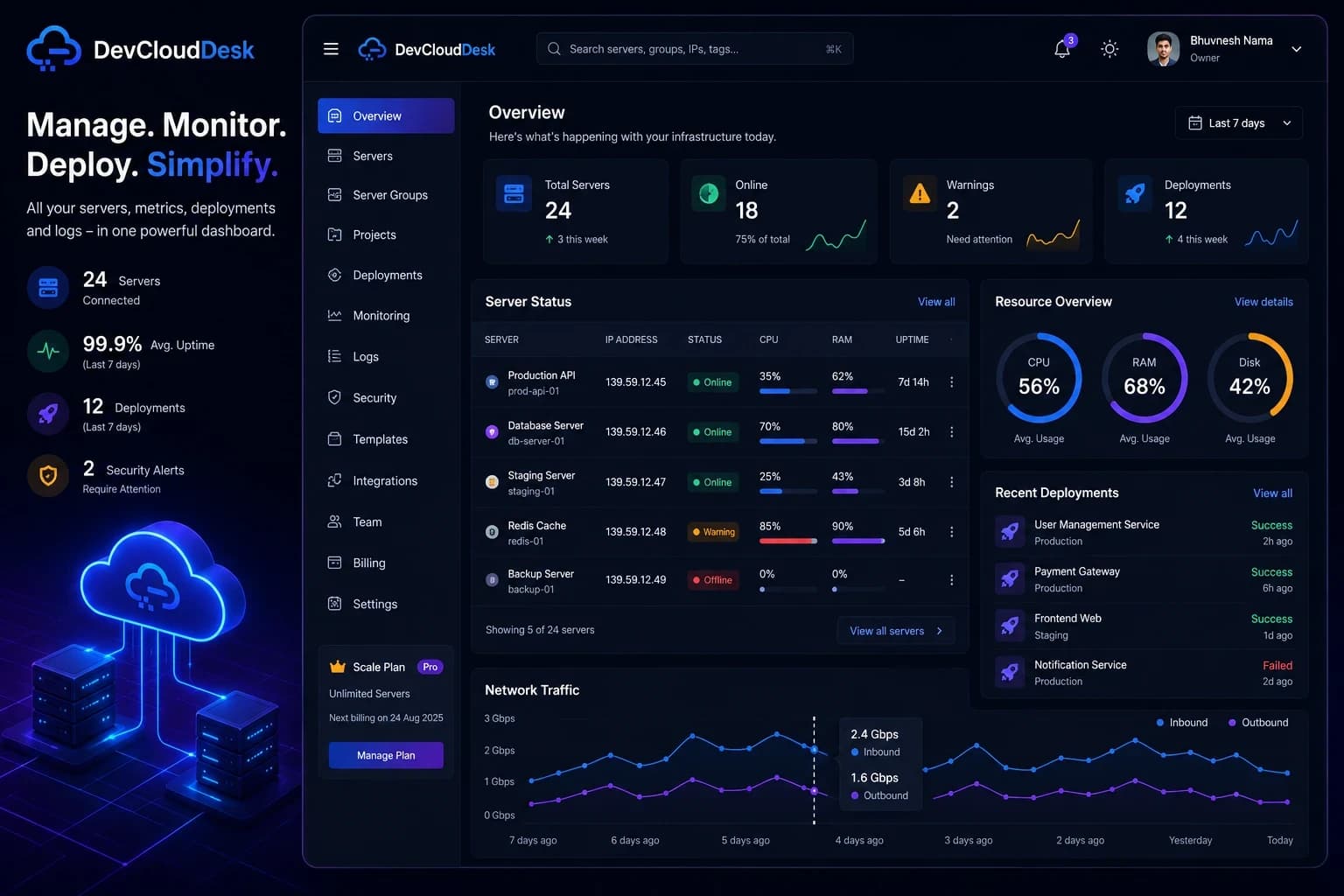
How to Manage Multiple Servers From One Dashboard Without Complex DevOps Tools
Managing servers is one of the most important tasks for developers building modern applications.
Whether you are running a personal project, a startup, or a production application, server management becomes difficult as infrastructure grows.
A developer may start with one VPS, but soon they have:
- Development servers
- Production servers
- Database servers
- Backup servers
- Client servers
- Multiple cloud providers
At this point, managing everything through separate tools becomes inefficient.
The Problem With Traditional Server Management
Most developers manage servers using a combination of different tools.
A typical workflow looks like this:
| Task | Common Tool |
|---|---|
| SSH Access | Terminal |
| File Management | SFTP/File Manager |
| Monitoring | Cloud Provider Dashboard |
| Deployments | CI/CD Tools |
| Logs | Separate Monitoring Tools |
| Security | Manual Scripts |
This creates a fragmented workflow.
Developers constantly switch between applications to complete simple tasks.
Common Challenges When Managing Multiple Servers
1. Too Many SSH Connections
SSH is powerful, but managing many servers manually becomes difficult.
Developers need to remember:
- Server IP addresses
- SSH keys
- User permissions
- Different commands
- Server environments
A single mistake can affect production systems.
2. Lack of Real-Time Visibility
Without proper monitoring, developers may not know when a server has problems.
Important metrics include:
| Metric | Why It Matters |
|---|---|
| CPU Usage | Detect high resource usage |
| Memory Usage | Prevent application crashes |
| Disk Space | Avoid storage failures |
| Network Traffic | Identify unusual activity |
| Running Services | Monitor application health |
3. Deployment Complexity
Modern applications often require:
- Docker containers
- Environment variables
- Reverse proxies
- SSL certificates
- Database migrations
Doing these manually on multiple servers takes time and increases the chance of errors.
What Is a Modern Server Management Dashboard?
A server management dashboard combines essential infrastructure tools into one platform.
Instead of using multiple applications, developers get a centralized control panel.
A modern platform should provide:
Server Access
↓
Monitoring
↓
Deployment
↓
Security
↓
Automation
Everything should work together.
Key Features Developers Need
1. Centralized Server Management
A single dashboard should allow developers to:
- Add multiple servers
- Organize servers into groups
- View server status
- Manage connections
- Access important information quickly
This reduces the time spent switching between different tools.
2. Server Monitoring
Real-time monitoring helps developers understand infrastructure health.
Important monitoring features:
- CPU monitoring
- RAM usage
- Disk usage
- Network statistics
- System information
- Resource alerts
Example:
| Server | CPU | RAM | Status |
|---|---|---|---|
| Production API | 35% | 62% | Healthy |
| Database | 70% | 80% | Warning |
| Testing Server | 15% | 40% | Healthy |
3. Integrated Terminal Access
Developers still need command-line access.
A modern dashboard should provide:
- Browser-based terminal
- Secure SSH connection
- Multiple server switching
- Command execution
This removes the need to configure SSH connections repeatedly.
4. Deployment Automation
Deployment should not require repeating the same manual commands.
A better workflow:
Automation reduces deployment errors and saves time.
5. Better Security Management
Server security should not depend only on manual checks.
Important security features include:
- SSH configuration checks
- Open port detection
- Login monitoring
- Firewall management
- Security recommendations
Why Developers Are Moving Toward Unified Infrastructure Platforms
The modern software industry is moving faster than ever.
Developers are expected to:
- Build applications quickly
- Maintain reliable servers
- Monitor performance
- Improve security
Using ten different tools makes this process harder.
Unified infrastructure platforms solve this problem by combining everything developers need in one place.
How DevCloudDesk Helps Developers Manage Infrastructure
DevCloudDesk is built around one simple idea:
Server management should be simple, centralized, and developer-friendly.
With DevCloudDesk, developers can manage infrastructure through one dashboard instead of switching between multiple tools.
The platform helps with:
- Server management
- Monitoring
- Terminal access
- File management
- Deployment workflows
- Infrastructure visibility
Who Needs a Server Management Platform?
Developers
Manage personal projects and production servers easily.
Startups
Operate infrastructure without building a large DevOps team.
Agencies
Manage multiple client environments from one place.
DevOps Engineers
Reduce repetitive infrastructure tasks.
Frequently Asked Questions (FAQ)
How do I manage multiple Linux servers?
You can manage multiple Linux servers using a centralized server management platform that provides monitoring, SSH access, automation, and deployment tools.
What is the best tool for server management?
The best server management tool depends on your requirements. Modern platforms focus on combining monitoring, deployment, security, and access management in one dashboard.
Can I manage cloud servers from one place?
Yes. A centralized infrastructure dashboard allows developers to manage servers from different environments through one interface.
Conclusion
Managing multiple servers does not need to be complicated.
Traditional workflows require developers to switch between many tools, making infrastructure management slower and harder.
Modern server management platforms simplify this process by bringing monitoring, access, automation, and security into one place.
As applications become more complex, developers need simpler ways to manage infrastructure.
Enjoyed this guide?
Share it with your fellow engineering team members.
Ready to simplify server management?
Get secure browser terminals, instant CPU/RAM alerts, SFTP file management, and automated deployments in minutes.